
Learn GameSalad by building real games
Step-by-step tutorials are built into GameSalad Creator. Open the Tutorials tab and build a complete game next to the editor, with written steps, screenshots, and video, and Bowlbot on hand when you get stuck.
Start Monster Maze free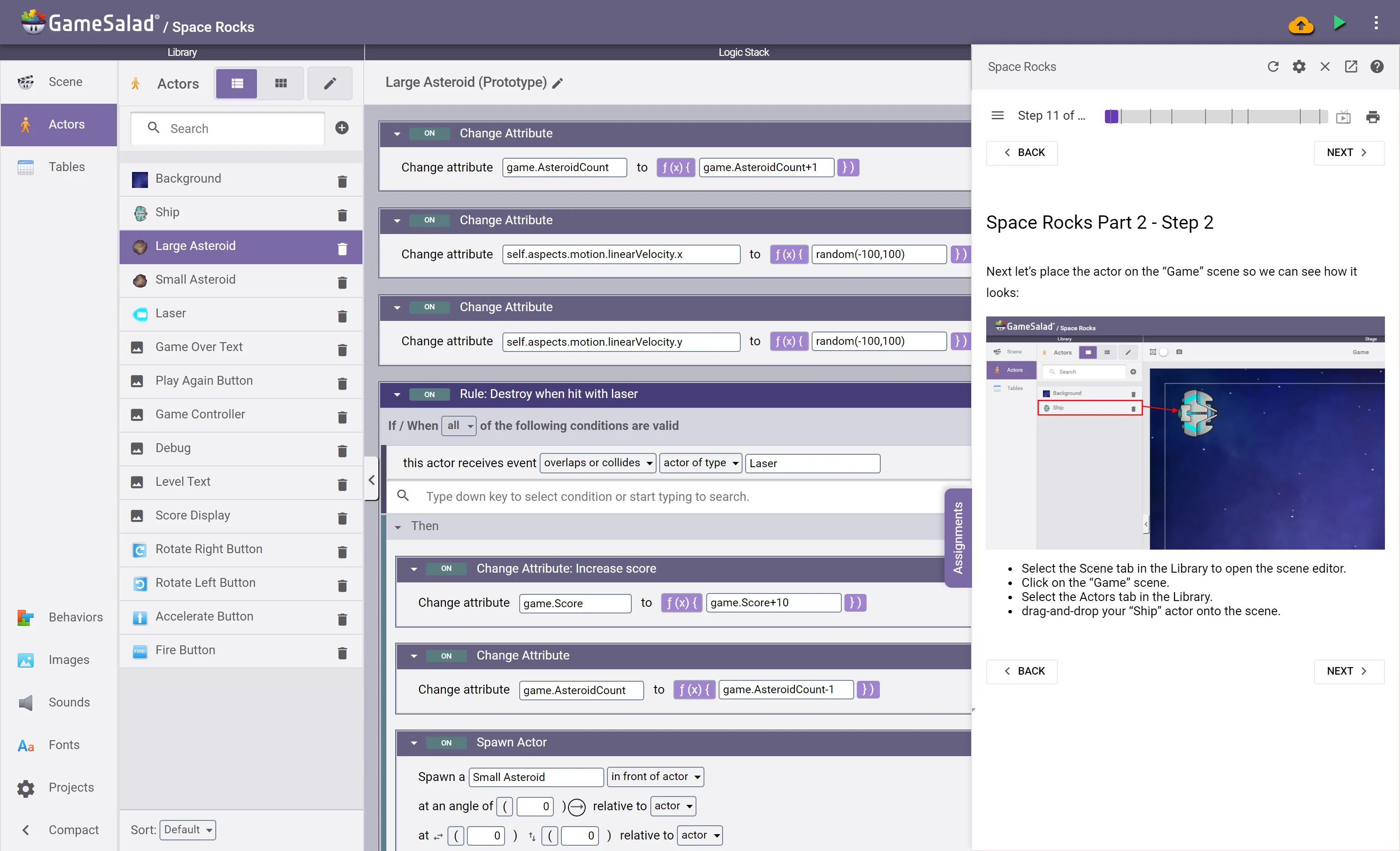
How the tutorials work
Right beside your game
Click the purple Tutorials tab in Creator. Each lesson opens in a panel next to the editor, so you follow a step and make the change in your own project at the same time.
Steps, screenshots, and video
Every step has written directions and screenshots you can click to enlarge. Most sections also have a video that plays in the panel or pops out, and Creator remembers where you stopped.
Go at your own pace
A progress bar shows where you are. Jump between sections from the table of contents, go back a step, or print the lesson.
Bowlbot follows along
Bowlbot, GameSalad's AI agent, knows which lesson and step you're on. Ask it to help you follow along, or to guide you with questions so you work it out yourself.
Start here: Monster Maze
Monster Maze is the first tutorial we recommend. You learn the Creator interface while building a maze game where you collect items. Along the way you use the ideas every programmer uses: conditions, variables, user input, movement, collisions, and win and lose conditions.
New to GameSalad? When you first sign in, the welcome screen offers Build Monster Maze, or you can take a quick tour of Creator first.
All tutorials
Three tutorials are free. Pro unlocks all of them.
| Tutorial | Sections | Video | Plan |
|---|---|---|---|
| Monster Maze | 7 | Yes | Free |
| Wizard Run | 9 | Yes | Free |
| Space Rocks | 9 | No | Free |
| Fruit Fall | 10 | Yes | Pro |
| Good Tank vs Bad Tank | 10 | Yes | Pro |
| Pong | 9 | Yes | Pro |
| Space Runner | 13 | Yes | Pro |
| Top Notch Trivia | 12 | Yes | Pro |
| Sea Sprint | 26 | No | Pro |
| Mystery Room | 8 | Yes | Pro |
Wizard Run tours the interface with a ready-made platformer, then has you lay out your own levels. Space Rocks builds an asteroid-blasting space shooter.
Starter projects
Every tutorial has a matching starter project with its art and sound, under New from template in Creator, along with more starters to remix (Dragon Escape, Salad Gardens, Bowlbot Survivor, and others), finished example games, and classic projects like a platformer, a breakout game, and a top-down car race. Pro adds more advanced projects such as menus, a card deck, and a word game.
Art and sound for your games
Need a spaceship, a tileset, or a jump sound? Ask Bowlbot. It searches thousands of free images, sprite sheets, and sounds from GameSalad, Kenney (kenney.nl), GameArt2D, and more, imports the one you pick, and adds the credit to your game. You can also download free art packs from the Asset Bank.
Teaching a class?
GameSalad for Education pairs the tutorials with full lesson plans, quizzes, project assignments, and a teacher dashboard to assign them and track progress. See the teacher guide.
More help
- Help Center: how every feature works.
- GameSalad Forums: ask other creators.
- Asset Bank: free art packs for your games.
Tutorial questions
Are GameSalad tutorials free?
Yes. Monster Maze, Wizard Run, and Space Rocks are free with a GameSalad account. Pro unlocks every tutorial, including Fruit Fall, Space Runner, Top Notch Trivia, and Sea Sprint.
Where are the tutorials in GameSalad Creator?
Sign in at creator.gamesalad.com and click the purple Tutorials tab on the side of the editor. Pick a tutorial and it opens in a panel next to your game.
Which tutorial should I start with?
Monster Maze. It introduces the Creator interface and the basics of game logic while you build a complete maze game.
Do I need to know how to code?
No. GameSalad uses drag-and-drop rules and behaviors, and the tutorials walk you through each one.
What happened to learn.gamesalad.com?
Its video courses were made for the old desktop versions of GameSalad. The tutorials now live inside Creator, which runs in your web browser, so learn.gamesalad.com brings you here.

Build your first game today
Free to start. Open the Tutorials tab and begin with Monster Maze.
Start creatingLast updated