
Make a mobile game without code, then publish it as an app
Build your game in the browser by chatting with Bowlbot or with drag-and-drop behaviors. GameSalad turns the same project into an iOS or Android app you publish under your own developer account.
Start creating
How to publish your game as an app
- Build your game. Describe it to Bowlbot, GameSalad's AI agent, or put it together yourself in the visual editor. Everything runs in your browser.
- Test it on your phone. Install the free GameSalad Viewer app on iOS or Android, publish the game to your portfolio, and scan its QR code to play it on a real device.
- Publish. GameSalad's servers build your project into an app for the platform you pick: iOS, Android, HTML5, or macOS, with Windows and Linux coming soon.
- Submit it to the store. You sign the app and submit it with your own Apple or Google developer account, so you set the listing and the price, and the store pays you directly.
Step-by-step guides for signing and store submission are in the GameSalad Help Center. Building something bigger? See GameSalad for developers for MCP access, the engine, and open-source boilerplates.
What you need
GameSalad Pro
Pro ($29/month or $299/year) unlocks publishing to every platform. On Free you can build your whole game and publish it to the GameSalad Arcade. See pricing.
For the App Store: an Apple Developer account and a Mac
Apple requires a paid Apple Developer Program membership ($99/year) to publish apps, and signing an iOS app has to happen on a Mac. No Mac? A cloud Mac service works.
For Google Play: a Google Play developer account
Google charges a one-time registration fee to publish on Google Play. You sign your Android app with your own key before uploading it.
Your game, your business
No royalties
GameSalad takes no revenue share. Sales and in-app revenue go from the store straight to you.
You own what you make
You keep all rights to the games you create with GameSalad.
Your apps keep working
Published apps stay live if your membership ends. New iOS and Android versions often require republishing, which needs Pro.
Under the hood
An AI game maker you can still take apart
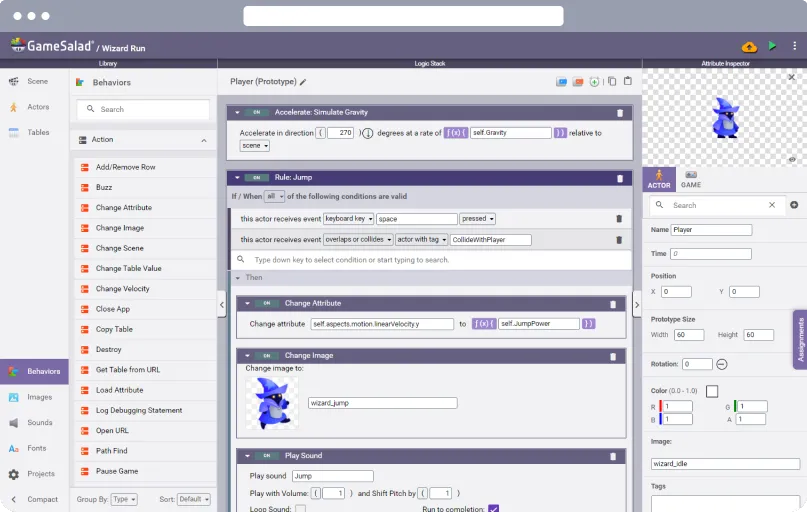
Every rule Bowlbot writes shows up as drag-and-drop logic in the visual editor, so you can see exactly how your game works and change it yourself before it ever reaches a store.
Real GameSalad games have shipped on the App Store, Google Play, Steam, and the web. See some of them.
Mobile publishing questions
Do I need to know how to code?
No. You build with Bowlbot or with drag-and-drop behaviors, and GameSalad's servers build the app for you.
Can I publish to the App Store from a Windows PC or Chromebook?
You can build and test your game on any computer. Apple requires a Mac to sign iOS apps, so the last step needs a Mac or a cloud Mac service. Android publishing has no Mac requirement.
Can I publish to app stores on the Free plan?
No. Free publishes to the GameSalad Arcade, where anyone can play your game in the browser. App store publishing needs Pro. Everything in the editor works on Free, so you can finish your game before you upgrade.
Does GameSalad take a cut of my sales?
No. There is no royalty or revenue share. Apple, Google, and other stores pay you directly under their own terms.
What happens to my published apps if I cancel Pro?
They keep working. You will need Pro again to publish updates, which new iOS and Android versions often require.

Your game app could be in the stores
Start free, build your game, and go Pro when you're ready to publish.
Start creating