
Teach computer science through game design
GameSalad for Education lets any educator teach computer science through game design, with full lesson plans, in-class activities, step-by-step student tutorials, and live teacher support. It runs in any web browser, even Chromebooks and iPads.
Request a quoteTrusted by school districts across the U.S.























In the classroom
Students build working games from day one
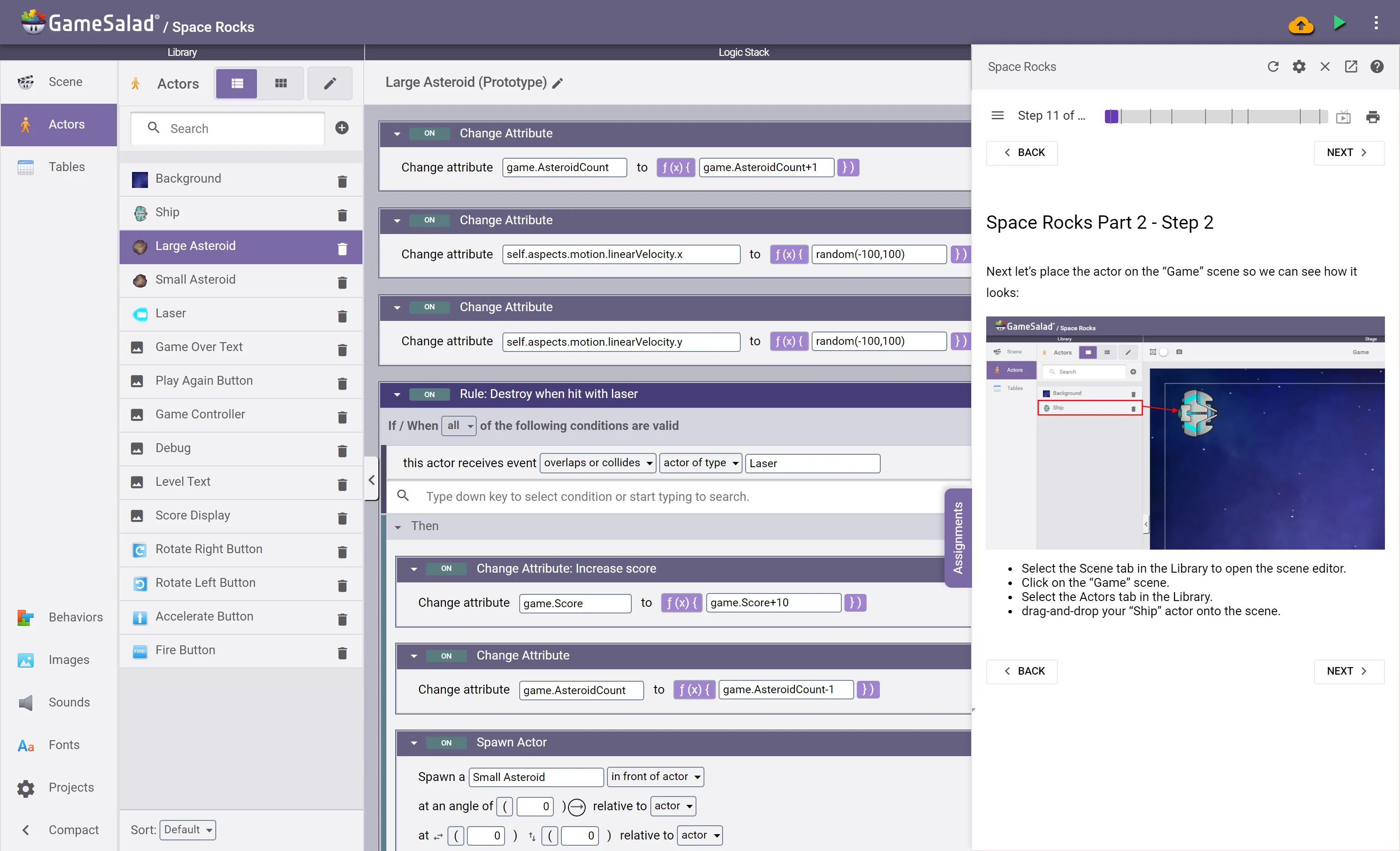
Using GameSalad Creator, students build their own working games. The syntax-free visual programming system lowers frustration and increases engagement, and students get instant feedback because they can preview their game at any time.
- Step-by-step tutorials are embedded directly in the platform — videos, written directions, and screenshots for different learning styles
- Project-based units of increasing complexity, divided into bite-sized pieces so you control the pace
- Every game is customizable, so each student can express their own vision
- Students can add their own art and sounds, publish to the web to share with family and friends, and play their creations on their own devices
Awards and recognition
 Tech & Learning Award of Excellence winner
 2021 GSV Cup Elite 200
 The EdTech Awards 2023
New
Bowlbot in the classroom
Bowlbot is an AI assistant inside GameSalad Creator and you have the power over student access:
- Learn Mode asks questions instead of giving answers. Hints are earned by attempts, and the last piece is always the student's.
- Vibe Mode builds alongside the student, like a coding agent, so ideas become playable games fast.
Turn either mode on or off per class from the Teacher Dashboard.

Teacher tools
Lesson plans and a dashboard that keep you ahead of the class
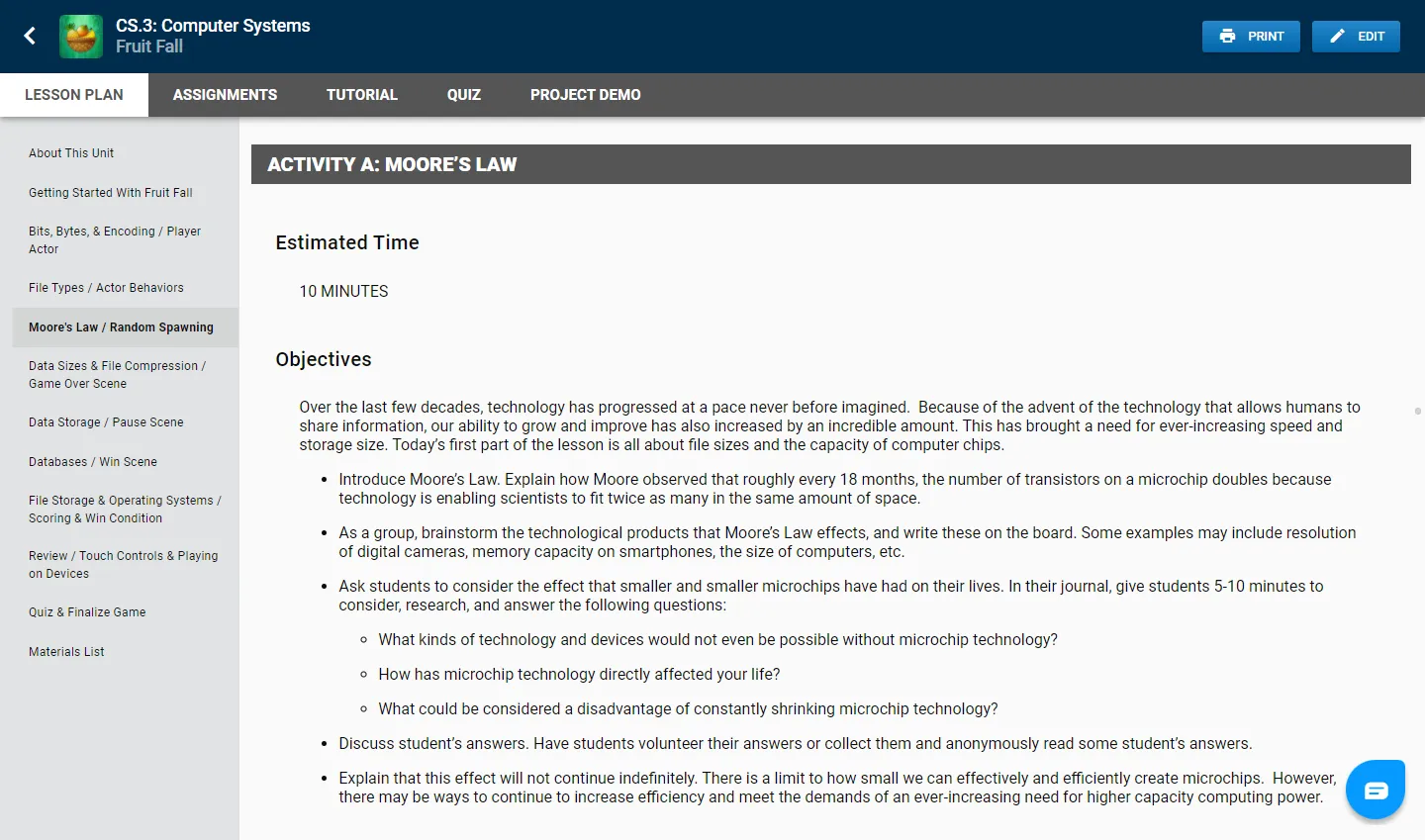
Each game tutorial is paired with a computer science lesson unit that includes up to 10 hours of instruction. A teacher dashboard lets you assign game creation tutorials and quizzes, see student progress, and access all lesson plan materials.
- Teacher-led in-class activities across a wide range of computing subjects, written to promote live discussion as a break from screen time
- Topics include the History of Video Games and Digital Citizenship alongside computer science foundations
- Use the whole curriculum as the basis of your class, or pick and choose from activities, assessments, and lectures
- Most teachers using GameSalad have no formal computer science background — you can learn alongside your students
- Lesson plans are aligned to CSTA, ISTE, and state computer science standards — see all standards alignments
- New to GameSalad? The teacher guide gets your class running in four steps
Not CSTA Validated. Alignment to the CSTA K-12 Computer Science Standards is GameSalad's own manual judgement. CSTA has not reviewed, validated, or endorsed this material.
Proven in real classrooms
Case study — Canutillo ISD enrolled a full grade level of ~200 6th grade students in a full-year GameSalad course, in a district of ~6,000 students, 70% economically disadvantaged and 29% LEP.
- 3%Increase in STAAR Math Meets & Masters scores
- 0%Dropout rate
- 93%Of licenses activated and used
See what GameSalad costs for your school
Tell us your grade levels and student count, and we'll send a quote.
Request a quoteEverything in Creator, plus the classroom
Classroom management
Create classes, enroll students, and see every project and every student's progress from the Teacher Dashboard. No personal accounts to chase.
You decide what students see
Per class, choose which templates and tutorials are available, whether Bowlbot is on, and which Bowlbot modes students can use — Learn Mode, Vibe Mode, or neither.
AI Grading Helper
Bowlbot reads a student's project and summarizes what they built and which concepts they used, so grading a class of games takes minutes instead of an evening.
Private arcades
Publish student games to a private arcade for your class or school — playable by classmates and families, invisible to the public internet.
Students under 13
Teachers stand in as the account holder for younger students, so elementary and middle school classes can use GameSalad without students needing their own accounts.
Your classroom partner
Teachers receive initial training and ongoing support — chat, email, and phone support, FAQ and how-to resources, advanced debugging help, and help with students' custom projects.
Works on the hardware you have
GameSalad is web-based and runs on any computer with internet access and a modern web browser, including Chromebooks and iPads. Chrome is recommended; minimum 2GB of RAM.
Sign-in that fits your district
Multiple sign-in options, including Google and Clever.
A place to show the work
Students publish to the GameSalad Arcade for free. Our student game contest gives them an audience beyond the classroom, with prizes for original projects. The 2027 Challenge opens November 26, 2026.
What teachers say
GameSalad has inspired my students to use their creativity. Each day, I see my students jump right into their games and strive to create something new and different. They are excited when their hard work pays off and they've created a workable, fun game to show their friends.

Andrea CarovillanoTechnology Teacher at Monroe JH
Thank you for adding the Teacher Dashboard, combining the tutorials in the Creator, and making it step-by-step and easy for our students to navigate. My students are fully engaged and cannot wait to start a new game! Thanks again for listening to teachers and implementing our ideas, WE LOVE GAME SALAD!

Patti GriffinCTE Teacher, Computer Science & KeyboardingRead the story →
GameSalad's low barrier of entry and powerful toolset is great for education. Students in my classes are learning the fundamentals of game design while actually designing their first game at the same time. Some have already taken on their own side-projects!

Mike RodriguezGame Design and Integration Instructor at MCAET
GameSalad lets students take their first steps in coding logic easily and quickly, but it still has great flexibility and power for those who want to tackle more complex projects.
Steve FloroPerry Lake High School
As a scientist, it’s the coolest thing to see kids incorporate the idea that STEM can be creative, because I feel like STEM has the stigma that art is creative, STEM is logical. And that’s far from the truth.

Jack FarrellLead STEM Instructor, Game Design Camp, Creative Encounters with ScienceRead the story →
My students loved how quickly they could create a fully functional game right from the start as they programmed in GameSalad, and I appreciate the visual platform and rigor required to develop a complex game.
Dr. Smadar BergmanGaming Concepts Teacher, Benito Juarez Community Academy - Chicago, ILRead the story →
Students are passionate about creating their own games. GameSalad gives students a great starting point, while also allowing them to grow as the designers & programmers of the future.

Doug GregoryDigital & Media Arts Teacher, PSJA Memorial High – Alamo, TXRead the story →
GameSalad Creator is the fastest and easiest way for my students to design and create their own games in the classroom.

David ConoverGame Design Teacher, John B. Connally High School – Pflugerville, TXRead the story →
I have found GameSalad to be particularly useful throughout a variety of undergraduate learning contexts in first-year and advanced writing, and digital rhetoric courses. GameSalad’s user-friendly interface requires no coding knowledge and offers an easy entry point for students to participate in game design as a compositional method.

Dr. Steve HolmesAssistant Professor of English, George Mason University - Fairfax, VARead the story →
Today’s youth are faced with more competition than ever before. By equipping them with the power of knowledge and new skill sets – like game design using GameSalad’s tool set – we are giving them the gift of advancement.

Denise JacksonCTE / Technology Apps Teacher, Wimberley High School – Wimberley, TXRead the story →
More for educators
- Curriculum: seven game design units, from Wizard Run to Top-Notch Trivia
- Computer science concepts in GameSalad: how CS concepts map to GameSalad features
- Middle school computer science: bridge the gap between Hour of Code and AP CS
- What's next after Scratch: why classes move up to GameSalad, and the teacher guide for making the switch
- Hour of Code: two one-hour game activities for your class
- Results: classroom stats and the Canutillo ISD case study
- Library Ready: self-paced game design for media libraries
- Tech camps, coding clubs, and maker spaces: game design for after-school programs
- Game design at home: how kids learn by making games outside school
- Data privacy & security plan: how we protect student data under district contracts
- Resellers & partners: buy through TIPS USA, Academia, Innocom, or Moana Digital
Questions from teachers
Do I need a computer science background to teach with GameSalad?
No. Most teachers using GameSalad have no formal computer science background. Every unit comes with full lesson plans, students follow step-by-step tutorials inside Creator, and you get training and live support. The teacher guide gets a class running in four steps.
What grades is GameSalad for?
GameSalad for Education is used across K-12, most often in middle and high school, and in colleges, camps, and libraries. Teachers act as the account holder for students under 13. See middle school computer science.
What devices does GameSalad run on?
Any computer with internet access and a modern web browser, including Chromebooks and iPads. Chrome is recommended, with at least 2GB of RAM. There's nothing to install.
How do students sign in?
Teachers create classes and enroll students from the Teacher Dashboard. Students can sign in with Google or Clever, among other options.
Is the curriculum aligned to standards?
Yes. Lesson plans are aligned to CSTA, ISTE, and state computer science standards, by our own review. See standards alignments and the curriculum.
Can I control whether students use AI?
Yes. Per class, you choose whether Bowlbot is on and which modes students get: Learn Mode, which asks questions instead of giving answers, Vibe Mode, which builds alongside them, or neither. See Bowlbot in the Classroom.
How is student data protected?
Student conversations with Bowlbot are not used to train any AI. Our data privacy and security plan covers how we protect student data under district contracts.
How much does GameSalad for Education cost?
It's licensed per school or district. Request a quote with your grade levels and student count, or buy through a reseller. Individual students and teachers can also start on the free plan.
Can I try it with my class first?
Yes. Book a demo and we'll walk you through it, or ask for a classroom trial. Anyone can also try Creator free.
Bring game-based learning to your classroom
Tell us your grade levels, student count, and start date, and we'll put together a quote or walk you through a demo.
Request a quote